Connected Papers
By Coda One Team · Last verified: March 2026
Disclosure: Some links earn us a commission at no extra cost to you. Rankings are independent — tools cannot pay for placement.
Visual graph tool that maps related papers from any seed paper
What is Connected Papers?
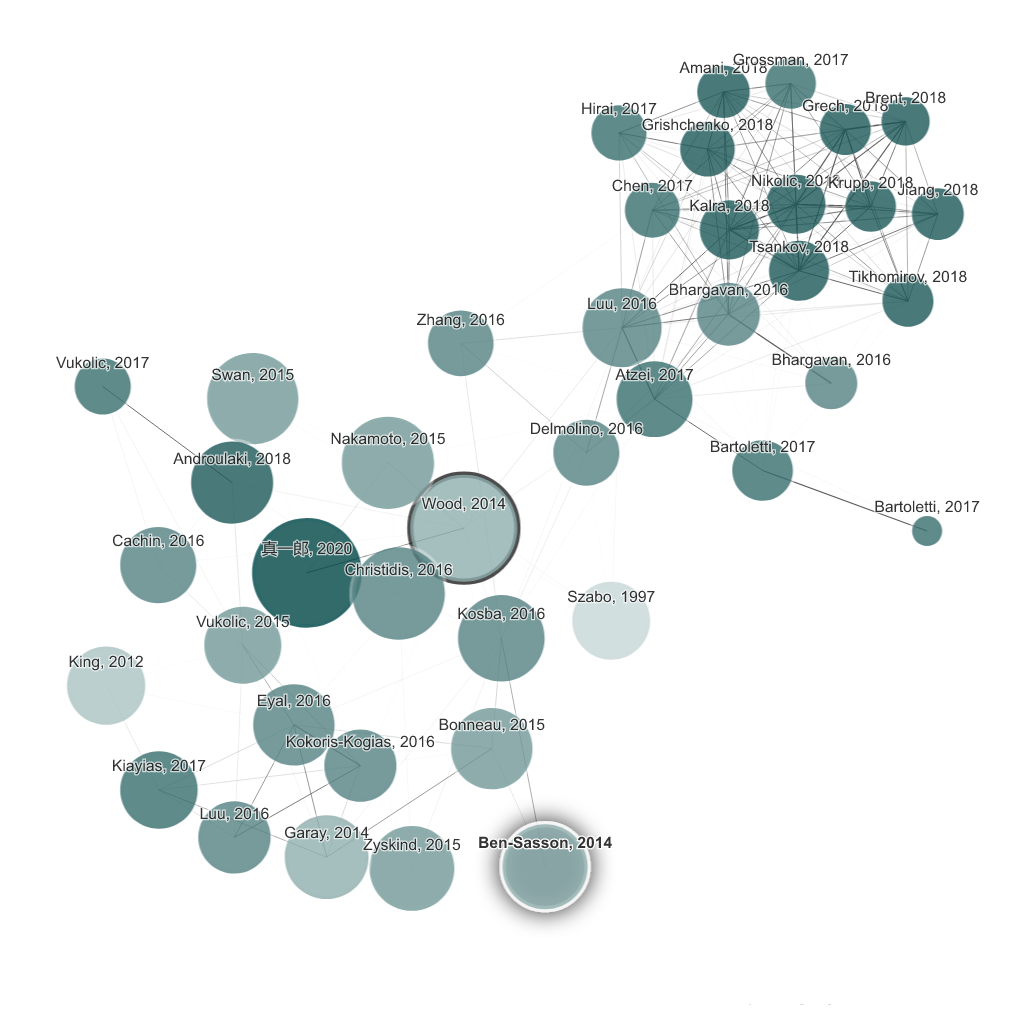
Connected Papers is a visual exploration tool that builds interactive graphs of academic papers related to a seed paper you provide. Rather than relying solely on direct citations, it uses a similarity metric based on co-citation and bibliographic coupling to find the most relevant connected work, surfacing papers you might miss in traditional literature searches.
The visual graph displays papers as nodes, with size indicating citation count and proximity reflecting similarity. This spatial layout makes it intuitive to spot clusters of related work and identify the most influential papers in a research area. Each paper node shows title, authors, year, abstract, and citation metrics on click.
Two key views complement the graph: Prior Works shows foundational papers that the field is built upon, and Derivative Works shows papers that built on those foundations. This helps researchers understand both the lineage and impact of ideas in their area.
Free users can build 5 graphs per month. The Academic plan at $3/month provides unlimited graphs and additional features. Connected Papers syncs with Zotero for seamless reference management integration.
Key Features
Pros & Cons
Pros
- ✓ Visual graph approach reveals connections invisible in text-based search
- ✓ Discovers relevant papers beyond direct citation chains
- ✓ Extremely affordable Academic plan at $3/month
- ✓ Clean, intuitive interface that is easy to learn
Cons
- ✗ Free tier limited to only 5 graphs per month
- ✗ Graph generation can be slow for highly cited seed papers
- ✗ Limited to academic papers — no patents, reports, or gray literature
Ready to try Connected Papers?
See if it fits your workflow — free plan available.
Video Tutorials
First Time User's Guide to Connected Papers
Andy Stapleton
Pricing
Free with 5 graphs/month; Academic plan at $3/mo for unlimited
Free
$0
- ✓5 graphs per month
- ✓Visual similarity graph
- ✓Prior and Derivative Works views
- ✓Paper details and abstracts
Academic
$3/mo
- ✓Unlimited graphs
- ✓Multi-origin graphs
- ✓Zotero integration
- ✓Full export capabilities
- ✓Priority graph generation
Pay with crypto using a virtual Visa card
Humanize AI content from Connected Papers
Transform AI-generated text into natural, human-sounding writing that bypasses detection tools.
Try FreeWho is Connected Papers for?
Exploring a new research area starting from a known key paper
Finding foundational prior work for literature review sections
Discovering recent derivative work building on seminal papers
Identifying research clusters and sub-communities in a field
Building comprehensive reference lists for grant proposals
Frequently Asked Questions
Is Connected Papers free?
Connected Papers offers a free tier with limited features. Free with 5 graphs/month; Academic plan at $3/mo for unlimited Paid plans unlock additional capabilities.
What are Connected Papers's key features?
Connected Papers's standout features include Visual similarity graphs showing related papers as interactive nodes, Co-citation and bibliographic coupling-based paper discovery, Prior Works view showing foundational research, Derivative Works view showing follow-up research. It offers 8 features in total designed for exploring a new research area starting from a known key paper.
Can I pay for Connected Papers with cryptocurrency?
Connected Papers does not currently accept cryptocurrency directly. However, you can pay with crypto using a virtual Visa card funded by USDT, USDC, or other stablecoins.
What are the best alternatives to Connected Papers?
Popular alternatives to Connected Papers include Consensus, DeepL, Duolingo. Each offers different strengths in pricing, features, and specialization.
Do I need to sign up to use Connected Papers?
Connected Papers requires an account to access most features. If you prefer no-signup tools, browse Coda One's free tools.
Does Connected Papers work on mobile?
Connected Papers works in any modern browser on desktop, tablet, and mobile — no install required. For offline or on-device workflows, check our tool catalog for alternatives.
Is my data safe with Connected Papers?
Review Connected Papers's privacy policy at https://www.connectedpapers.com for specifics on data retention. For browser-local processing (no server upload), see Coda One's PDF and image tools.
What pricing plans does Connected Papers offer?
Connected Papers offers 2 plans: Free, Academic. Starts at Free. Compare with Coda One's own pricing.
Can I cancel or get a refund from Connected Papers?
Cancellation and refund policies are set by Connected Papers — check their terms at https://www.connectedpapers.com. Coda One's own paid plans can be cancelled anytime from your subscription dashboard.
How can I pay for Connected Papers with USDT or USDC?
Since Connected Papers does not take crypto directly, the practical route is a Coda One virtual Visa card funded by USDT/USDC, which works anywhere Visa is accepted.
Who is Connected Papers best for?
Connected Papers is most useful for Exploring a new research area starting from a known key paper, Finding foundational prior work for literature review sections, Discovering recent derivative work building on seminal papers. For related workflows, explore Coda One's AI tool catalog.
Related Tools
Consensus
AI-powered academic search that synthesizes findings from peer-reviewed papers
- Natural language search across 200M+ academic papers
- AI-synthesized answers with inline citations
- Consensus Meter showing research agreement levels
DeepL
AI translation service regarded as the most accurate for European languages
- Neural machine translation across 30+ languages
- Document translation preserving original formatting
- DeepL Write for style, tone, and grammar improvement
Duolingo
World's most popular AI-powered language learning app with 40+ languages
- Adaptive AI lessons across 40+ languages
- Roleplay conversations with AI characters (Max)
- Explain My Answer detailed AI feedback (Max)
Khan Academy (Khanmigo)
Free education platform with GPT-4 powered AI tutor for personalized learning
- GPT-4 powered AI tutor using Socratic questioning method
- Thousands of free video lessons across all major subjects
- Interactive practice exercises with instant feedback
Discover More AI Tools
Weekly curated tools, scenarios, and MCP server updates.
Disclosure: Some links on this page may be affiliate links. We may earn a commission if you make a purchase through these links, at no additional cost to you. This helps support Coda One.