Applio
By Coda One Team · Last verified: March 2026
Disclosure: Some links earn us a commission at no extra cost to you. Rankings are independent — tools cannot pay for placement.
Open-source voice conversion tool powered by RVC technology
What is Applio?
Applio is an open-source voice conversion tool built on top of Retrieval-Based Voice Conversion (RVC) technology. It allows users to transform one voice into another while preserving the original speech's intonation, timing, and emotion. The tool is popular among music producers, content creators, and AI enthusiasts for creating AI voice covers and voice transformations.
The platform provides a user-friendly Gradio-based web interface that simplifies the traditionally complex process of voice model training and inference. Users can train custom voice models from audio samples, convert audio files using pre-trained models, and fine-tune parameters like pitch shifting and feature extraction methods (RMVPE, Crepe, Harvest) for optimal results.
Applio supports multiple audio formats, batch processing, and offers both a local installation and a Google Colab option for users without powerful GPUs. The project maintains an active model repository where the community shares pre-trained voice models. It also includes tools for dataset preparation, audio preprocessing, and model management.
As one of the most popular RVC forks on GitHub, Applio has built a large community around voice conversion experimentation. It is frequently used for creating AI song covers, voice acting experiments, and audio content production.
Key Features
Pros & Cons
Pros
- ✓ Completely free and open-source with active development
- ✓ High-quality voice conversion rivaling paid alternatives
- ✓ Large community with thousands of shared voice models
- ✓ Runs locally for full privacy or on Google Colab without a GPU
Cons
- ✗ Requires technical knowledge for local installation
- ✗ Training quality depends heavily on input audio quality and quantity
- ✗ GPU recommended for reasonable training and inference speed
Ready to try Applio?
See if it fits your workflow — completely free.
Video Tutorials
Applio Tutorial 2025 - Train Your Own AI Voice Model
Social&Apps
Pricing
Free and open-source (MIT License)
Open Source
$0
- ✓Full voice conversion capabilities
- ✓Custom voice model training
- ✓Gradio web interface
- ✓Batch audio processing
- ✓Community model repository
- ✓Google Colab support
Pay with crypto using a virtual Visa card
Humanize AI content from Applio
Transform AI-generated text into natural, human-sounding writing that bypasses detection tools.
Try FreeWho is Applio for?
Creating AI voice covers of songs in different voices
Voice acting and dubbing for content creation
Experimenting with voice transformation for music production
Building custom voice models for personal or creative projects
Preserving or recreating voices for artistic purposes
Frequently Asked Questions
Is Applio free?
Applio is open source and free to use. Free and open-source (MIT License)
What are Applio's key features?
Applio's standout features include RVC-based voice conversion with high fidelity, Custom voice model training from audio samples, Multiple pitch extraction methods (RMVPE, Crepe, Harvest), Gradio web UI for easy operation. It offers 8 features in total designed for creating ai voice covers of songs in different voices.
Can I pay for Applio with cryptocurrency?
Applio does not currently accept cryptocurrency directly. However, you can pay with crypto using a virtual Visa card funded by USDT, USDC, or other stablecoins.
What are the best alternatives to Applio?
Popular alternatives to Applio include ElevenLabs, Krisp, Murf.ai. Each offers different strengths in pricing, features, and specialization.
Do I need to sign up to use Applio?
Applio can be used without creating an account for basic features. See the full free tools list for more no-signup options.
Does Applio work on mobile?
Applio works in any modern browser on desktop, tablet, and mobile — no install required. For offline or on-device workflows, check our tool catalog for alternatives.
Is my data safe with Applio?
Review Applio's privacy policy at https://applio.org for specifics on data retention. For browser-local processing (no server upload), see Coda One's PDF and image tools.
Who is Applio best for?
Applio is most useful for Creating AI voice covers of songs in different voices, Voice acting and dubbing for content creation, Experimenting with voice transformation for music production. For related workflows, explore Coda One's AI tool catalog.
Related Tools
ElevenLabs
Ultra-realistic AI voice synthesis with instant voice cloning
- Ultra-realistic text-to-speech in 32 languages
- Instant and professional voice cloning
- Real-time streaming speech synthesis
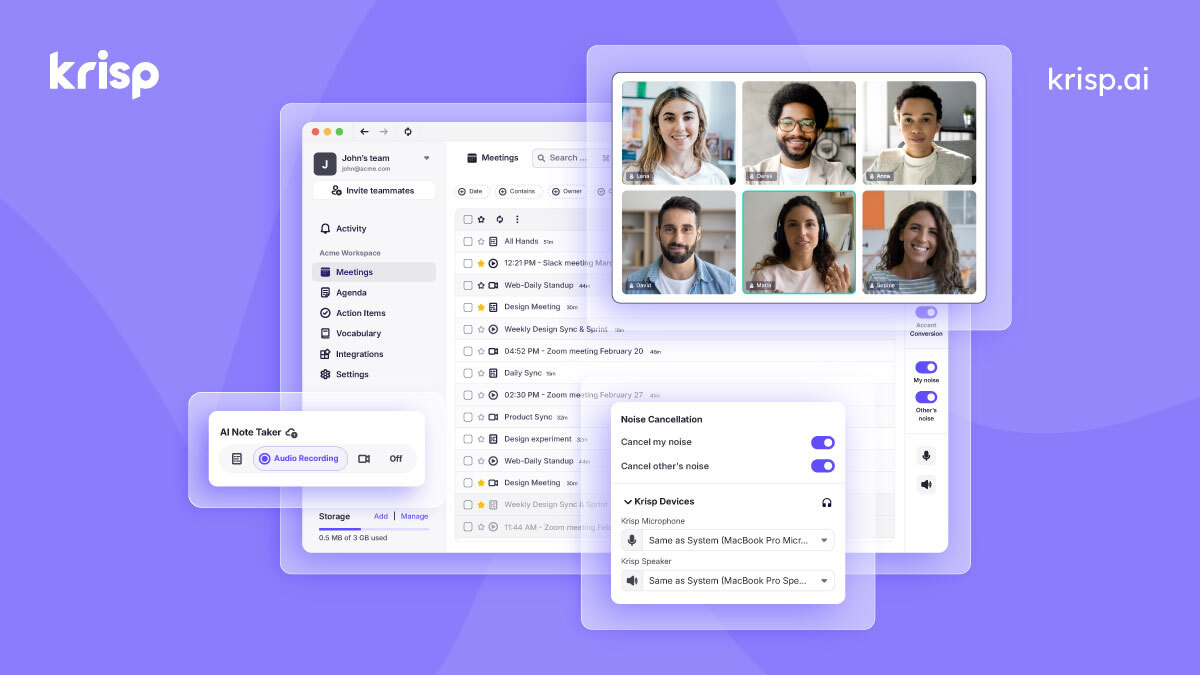
Krisp
AI noise cancellation and voice enhancement for calls and meetings
- Real-time AI noise cancellation for calls
- Echo and background voice removal
- On-device audio processing for privacy

Murf.ai
Enterprise AI voiceover platform for e-learning and corporate content
- 200+ AI voices across 30+ languages
- Studio editor with pitch, speed, and emphasis controls
- Video and voiceover synchronization

Otter.ai
AI meeting transcription with automated notes and action items
- Real-time meeting transcription with speaker identification
- Automated meeting summaries and key takeaways
- Action item extraction and assignment
Discover More AI Tools
Weekly curated tools, scenarios, and MCP server updates.
Disclosure: Some links on this page may be affiliate links. We may earn a commission if you make a purchase through these links, at no additional cost to you. This helps support Coda One.